Which Google Snake Mod Loader Version Should You Install?
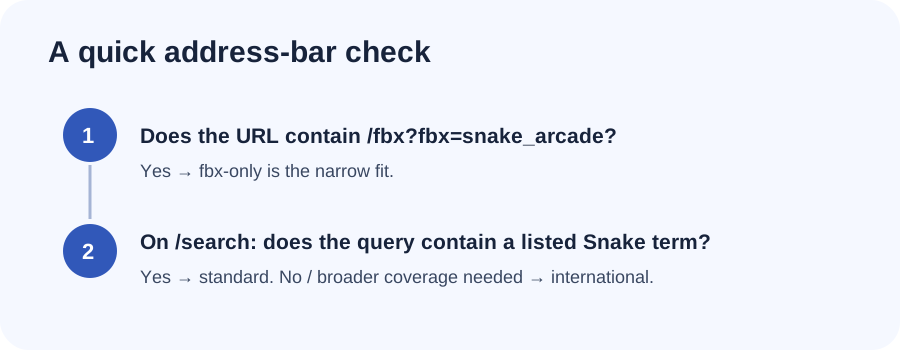
Look at the address bar where you actually play. If it says /fbx?fbx=snake_arcade, choose fbx-only. If it is a Google results page and your search contains “snake” or a supported Snake term, choose standard. If you need the loader on other Google search pages too, choose international—the maintainer says to use it only when the narrower versions do not work.
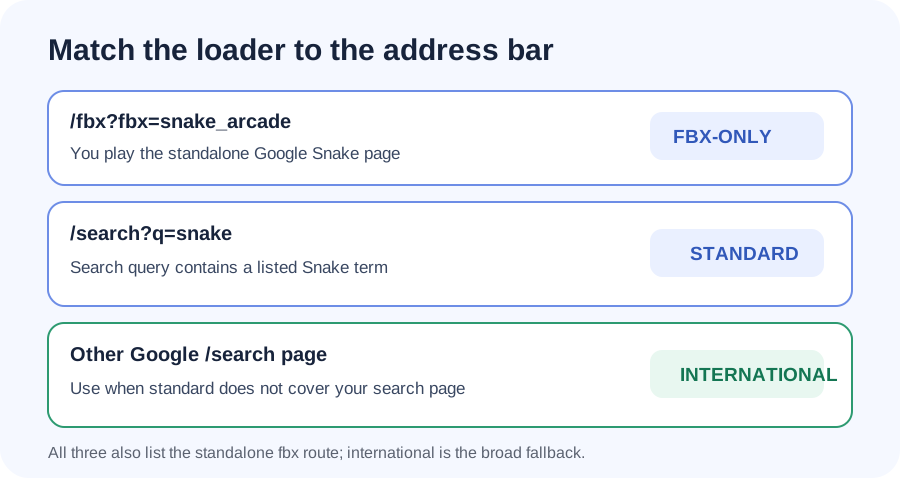
| What the address bar shows | Install | Why it matches |
|---|---|---|
google.com/fbx?fbx=snake_arcade | fbx-only | Targets the standalone fbx Snake page. The README recommends it if that is the only page where you play. |
google.com/search?q=snake, or another Google search URL containing “snake” or a listed equivalent | standard | Targets common Snake searches and the standalone fbx page, so it covers both of those launch paths. |
A Google /search page that does not match the standard version’s Snake terms | international | Targets every Google search page, as well as fbx. The README says to use this if the narrower versions do not run for you. |
Read the address, not just the game name
The search-result game and the standalone fbx game are both Google Snake, but the loader treats them as different page targets. The fbx URL contains the path /fbx and parameter fbx=snake_arcade. A search-result game instead appears on a Google URL with the /search path and your query in the address.
Country-specific Google domains can vary. The maintained scripts list multiple Google domains; for choosing among these three versions, the useful part is the page path and, for standard, the search term. You do not need to guess based on the game’s appearance.
What each version matches
fbx-only: choose this if you always open Snake directly at the fbx address. Its userscript metadata lists fbx Snake URLs as its matches. It does not list Google search-result pages.
standard: choose this when you start by searching Google for Snake or one of the listed equivalent terms. Its metadata matches qualifying Snake search URLs and also includes the fbx page. The project’s README says the search term needs to contain the full listed word; for example, a query that does not contain “snake” is outside this version’s stated search target.
international: choose this only if you want coverage across Google search pages beyond the standard term list, or the narrower script does not run where you play. Its metadata includes Google /search pages without the term restriction and also includes the fbx page. That broader match is why it is the fallback in the README rather than the first choice for everyone.
Two quick examples
If you open https://www.google.com/fbx?fbx=snake_arcade from a bookmark every time, install fbx-only. If you type “google snake” into Google and launch the game from those results, install standard. If you need the script on other Google search pages too, use international as the maintainer directs.
The README also recommends using a userscript manager for this route and says the loader is not compatible with Greasemonkey. Check the current maintainer instructions and choose the install link from that repository. These mappings describe the scripts’ declared URL coverage; they are not a live compatibility test of every browser or game update.
Sources
The three choices above follow the maintainer’s installation table and each script’s declared URL rules: fbx-only, standard, and international.